
 |
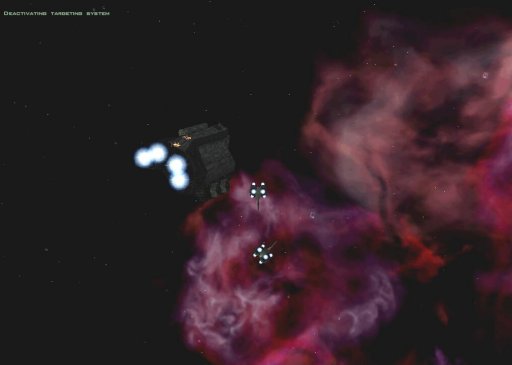
Training Mission If you're new to FreeSpace, the demo includes a basic "training mission" very similar, if not identical, to that seen in FreeSpace 1. It walks you through basic flight, targeting, and the various HUD systems. In addition to having a flight instructor walk you through the controls, you have the opportunity to engage and destroy a series of drones attacking a troop transport (one of the many new ships created for FreeSpace 2).
The customizable HUD was one of the strongest and most innovative features in FreeSpace, so not much else has changed in the demo. However, Volition is working on a new communications control system to make sending orders to friendly wings easier during the middle of battle. This "intuitive messaging" feature also has not been added to the demo, but could be extremely useful in battle. The ability to quickly give orders to your AI companions helps to keep the game fluid and can often make the difference between winning and losing a mission.
One feature which will help new pilots learn the ropes is the automatic targeting of capital ship turrets. The reason behind this is that the "target turret" feature (default key: "K") has been overlooked by many pilots in FreeSpace 1. Turrets are the most dangerous threat from a capital ship, so taking out a few turrets will help neutralize the threat they pose. And it's much easier to take out the turrets than the ship itself, making this a logical change even though some more experienced FreeSpace pilots will find it to be a bit annoying. FreeSpace veterans have the option to skip the training mission. Some some may be tempted because it only explains the basics of the flight and targeting systems, but not the allocation of shields and weapons, communications or the new beam weapons. I would suggest using the training mission as some additional time to soak in the new atmosphere and the improvements. Otherwise, you might find yourself distracted by the incredible graphics. Never before has a space flight simulation looked this good, especially the background "nebula" bitmap. Whether you play through the training mission or skip it, don't expect to be completely prepared for your first mission... [ Previous Page | Next Page ] |
|
FreeSpace Watch is copyrighted 2000 except where Volition or Interplay may apply. Web design by Colin Czerneda and Todd Miller. |
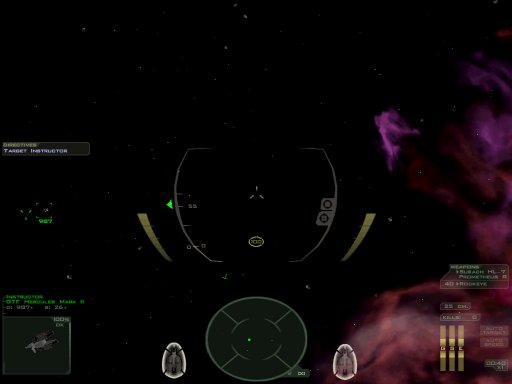 The new HUD resolution is immediately noticeable if you have a newer 3D card, and there is plenty of screen to spare in the 1024x724 mode. The biggest change to the HUD in the demo is the central targeting icons, which are crisper and more curved. A cool feature which is not activated in the demo is the ability to change the color of the HUD for each item, with slider bars for the color selection.
 Other valuable tips and reminders about useful keys and features in FreeSpace are provided by an initial "tip" screen that appears every time you start the demo (unless you disable the feature). Messages in the demo missions also provide useful "how-to" tips that accompany in-flight messages. There features show a clear effort to introduce the new pilot into the FreeSpace controls as easily as possible. However, anyone with experience in a flight sim will quickly feel at home in the dogfighting atmosphere, and the full FreeSpace controls are certainly less difficult to learn than modern jet fighter sims.

