|
This section is a walkthrough of building a very simple mission. A lot of details are ignored, in order to produce a playable mission as quickly as possible. The general procedure for creating a mission is as follows:
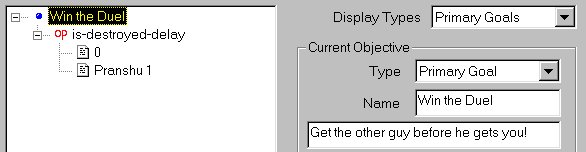
Designing the mission A mission should be planned out ahead of time, at least to some extent. A pencil and paper may come in handy. There's nothing wrong with making it up as you go along (you'll probably need to make some changes for balance anyway), but the process will be easier the more things are thought of ahead of time. This mission will be a simple duel: a Terran Ulysses fighter against a Shivan Basilisk. They will be placed a couple of kilometers apart, and the mission goal will be to destroy the other fighter. Creating objects To make things look nicer, you may want to play with the View menu. In particular, you may want to turn on either Show Outlines or (if you have a fast computer) Show Ship Models. With that Ulysses there, half of our object creation is already done; we just have to put in the Basilisk. Let's start it a few kilometers away. Notice "Units = 10.0 Meters" in the lower right. This means that each of the small squares is 10 meters across; the big squares are 100 meters across. We want to put the Basilisk a couple of kilometers away from the Ulysses, but we can't see that point yet. We'll have to move the camera. You can use the A and Z keys to move forward and backward with the camera. (If this is too fast or too slow, select a different option for Movement under the Speed menu.) Move back until you can see a point 2 kilometers (2,000 meters) in front of the Ulysses. Notice that the scale (at lower right) changes as you move back. Now, use the pull-down object list (far right of the toolbar under the menus), which currently says "GTF Ulysses". Pick "SF Basilisk". Finally, hold down Ctrl and click on the place where the Basilisk should go. Accuracy isn't terribly important. We need to put these ships in wings, even though each wing is only one ship. Select the Ulysses (by clicking on it or lassoing it), and then press the "Form Wing" button. A window will pop up, asking for the name of the wing. Call this Alpha. Put the Basilisk into a wing, and call the wing Pranshu. Using the editors We'll need to tell Pranshu 1 (the Basilisk) what to do. Select Pranshu 1 and open the Ships editor. Click on "Initial Orders". This opens up a window. In the first row and first column, select "Attack any ship" from the pull-down menu. Click OK, and then click on the X at the upper right to close the Ships editor. A mission goal is a necessity, too. Open the Mission Objectives editor, and click New Obj. On the right side, click on the Name box, and change it so it says "Win the Duel". Click in the box below, and make it say, "Get the other guy before he gets you!"
That was for the player. To explain this goal to FreeSpace, go over to the left side and click on the little +. The words "op true" should appear underneath. Right click on "true", and choose Replace Operator -> Objectives -> is-destroyed-delay. Two things appear underneath: the number 0, and Alpha 1. Some text at the bottom of the window explains these. The zero-second delay is fine, but we want the player to destroy Pranshu 1. Right click on Alpha 1, and pick Replace Data -> Pranshu 1. The top of the Mission Objectives editor should look like the picture at right. Click OK to close the objective editor. This is a good time to save. (It's always a good time to save!) This is under the File menu, naturally. Call the mission Duel. Testing |
|
FreeSpace Watch is copyrighted 2000 except where Volition or Interplay may apply. Web design by Colin Czerneda and Todd Miller. |